1. Easy Appointment scheduling
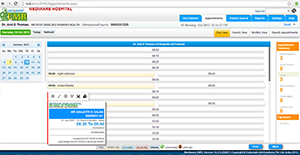
Patient appointment scheduling is an integral part of practice management. Calendar-based patient appointment scheduling in Mediware EMR, enables you to streamline your clinic's workflow and manage each member's schedules efficiently.
We lets you take full advantage of today's wired and wireless access by providing scheduling features that coordinate multiple appointments, handling appointment conflicts, and allow you to view scheduling with any browser and smart phones. So you can view upcoming appointments no matter where you are.
The appointment scheduling shows Breaking hours and days as grayed out for easy identification. Appointment Slot Status which shows Free, Reserved, Standby, Blocked and Break. If the appointment is confirmed, it shows with a green Tick Mark. The appointment scheduling calendar has three views, viz., Day, Week and Month. Each view shows appointments of multiple physicians across specialties.
Appointment duration can be easily changed by resizing the appointment slot. The Appointment Report allows you to print appointments of one or more physicians for the selected time period. The Appointment Scheduler also allows you to double/triple book a slot, for special situations.
Features:
- Easy Quick Appointment creation
- Instant warnings about scheduling conflicts
- Responsive Design
- Cut, Copy and Paste Appointment
- Appointment Editing and Cancellation
- Appointment Blocking and Cancellation
- Day, Week and Monthly Views
- Interactive Toolbar
- Accommodates multiple physicians with an easy view of all physicians' schedules
2. Electronic Medical Records
Electronic medical records are computerized form of patients' health information containing their current and past diagnoses, current and past medications, allergies, past consultations, lab results etc., used in healthcare facilities. Most physicians still use paper based records as it is easier to do data entry.
Inspite of this advantage, paper records have their own limitations
1. Illegible handwriting can lead to medical errors.
2. It's difficult to update paper records to keep up-to-date information of problem list, allergies etc. A lost paper can mean incorrect or inconsistent information.
3. Porting a patient's data across facilities is awkward. Have to rely on physical transportation or faxing.
4. Health Law and regulations require a healthcare facility to keep years of past medical records. 5 years of medical records of hundreds of patients will require considerable storage space.
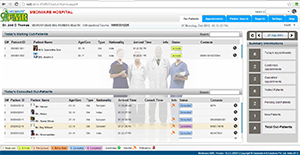
Using Mediware EMR software, healthcare facilities can overcome these issues, improve the efficiency at their facility and provide better quality of care to patients.
1. Electronic medical records help to maintain comprehensive information about patient demographics, current and past Vitals, Illnesses, Allergies, Diagnosis, Medications, Past Encounters, Lab Results, Radiology Results, Notes and Reports, Attached Documents etc. Up-to-date information is available at the click of a button.
2. Patient Treatment Summary with Attractive Dashboards.
3. Mediware EMR electronically porting patient data across different electronic medical records systems. Eliminates the hassle of Physical Transportation or Faxing.
4. Electronically storing data requires very little storage space compared to paper records.
5. Effective Cost Savings on paper and storage.
6. If EMR hosted and open with a domain will provides anytime anywhere access to patient data. Enables physicians to have encounter over phone.
7. It does not require expensive machine for clients. A html5 enabled browser in any Operating System can access Mediware EMR.
8. The advantages of electronic medical records software over paper records and the cost reduction over long term usage should encourage physicians to start adopting it in their practices.
Features:
- Providing clinical alerts and reminders
- Gathering all relevant information in one place
- Easy to diagnose diseases
- Improving aggregation, analysis, and communication
- Reduce/Prevent Medical Errors
- Improving patient outcomes
Treatment Summary
A Quick View of last encounter for the Doctor, which helps him to understand the last review on patient dashboard. There are dashboards for Complaints, Diagnosis, Allergies, Advices, Vitals, TPR charts etc…
Complaints & Exam
It is an important region that gives concise information about a patient's history and exam findings at the time of admission. In addition, it outlines a plan for addressing the issues which prompted the hospitalization/visit. This information should be presented in a logical way that prominently features all data immediately relevant to the patient's condition.
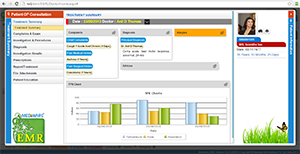
Chief Complaints
On interviewing with patient on complaints, Doctor can quickly select his favourite complaints and mention with Duration and Details.
History of Complaints
Doctor can give history of complaints as Onset, Duration, Aggregating Factors, Timing, Severity, Location/ Radiation, character, Reliving factors etc..
Past Medical History
This should include any past illness for which the patient has received treatment. All other medical diseases are listed and Doctor can select by a click. If any detailed descriptions are required, he can enter against that.
Past Surgical History
All past surgeries should be listed, along with the rough duration and details when they occurred.
Past & Personal History
In past & personal history, doctor can mark Patients Occupation, Current Marital Status, Number of Sons & Daughters and Highest Education. Also mark the level of Physical Strength, Psychological Strength, Sexual Activity and Notes.
Family History
This includes history of illnesses within the patient's immediate family with number of members and any one was diseased with cause. In particular, search for a history of any disease among first degree relatives marking.
Social History
This is includes to specify the Habit with Period and details like Alcohol Intake, Cigarette smoking, Tobacco etc..
Vital Signs
Vital signs include the measurement of temperature, respiratory rate, pulse, blood pressure, Weight, Height, BMI etc. These numbers provide critical information (hence the name "vital") about a patient's state of health.
Review of Systems
This is a list of questions, arranged by organ system, designed to uncover dysfunction and disease. Doctor can enter his comments on each organ after the examination with an easy dictionary on key press.
Physical Examination
Doctor screening for the disease by physical examination and he mark his finding on each location like abdomen, eyes, lungs, skin etc.. These symptoms lead to help diagnosis.
Allergies
Specify the allergic drugs related to the patient. Generic and Branded drugs will shown and alerts on prescription.
Special Comments
Doctor can specify any other remarkable comments here for his reference.
Investigation & Procedures
Clinical decision making is the process by which Doctor determine who needs what, when. Doctor can order and send request on Laboratory, Radiology and Procedures for the patient diagnosis.
Diagnosis
Diagnosis based on signs, symptoms, and laboratory findings during the encounter. Doctor can mark his provisional or final diagnosis based on ICD – 10 Standards.
Investigation Results
Doctor can view the Lab and Radiology Results on each encounter.
Prescriptions
The Prescription process has an easy and clean workflow that allows you search for drugs by Generic wise or Brand wise with all standards like strength, unit, route and dose, frequency etc. The drug library gives instant alerts on drug-to-drug, drug allergies and drug-to-food interactions. Drug Stock and Auto Calculation are available on prescription.
Doctor can view previous drug requests and able to made repeat with an easy click. The new Rx requests will be sending to selected pharmacy counter in the hospital.
Report/Treatment
Doctor can create the type of Report/Treatment Plan according to them and keep the details against each encounter. Doctor can create and store N number of Report and Treatment plans here.
File Attachments
Each patient have their own folders which help to store N number of attached document files like PDFs, Word Document, Images, Scanned documents etc. Doctor can easily to view these documents on future visits of patient.
Patient Education
Mediware EMR can store any type of Patient Education Documents like PDF, Presentations, Images, and Embedded Links from any Social sites like YouTube.